Hello, TypeScript enthusiasts! Today, we’re diving into a vital feature in TypeScript’s toolkit: Readonly<Type>. It’s essential for ensuring data stability and integrity, especially in server-side development.
🔒 Mastering Readonly<Type>:
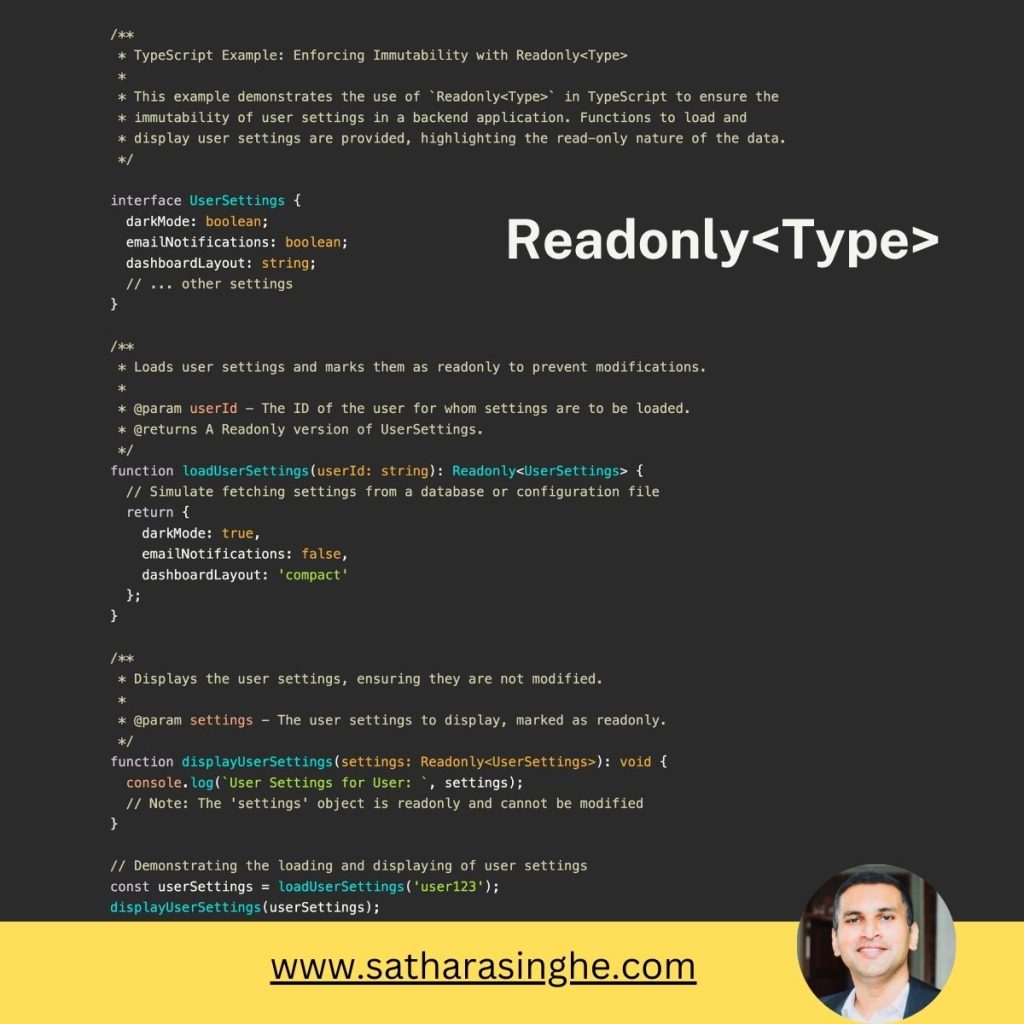
Readonly<Type> in TypeScript enables us to make an existing type immutable. This means once an object is created, its properties cannot be altered. It’s particularly crucial in backend applications where maintaining consistent state is key.
🌐 Backend Use Case: Immutable User Settings
In server applications, configurations and user settings are typically loaded once and should remain unchanged. Readonly<Type> ensures these settings stay consistent across the application’s runtime, preventing accidental modifications.
🛠️ Our Approach:
We’ll explore how Readonly<Type> can be applied to user settings in a server application, ensuring their immutability for enhanced reliability.
🔗 Explore the Example on GitHub:
For a hands-on look, check out the implementation on my GitHub:
💭 Why This Matters:
Using Readonly<Type> is about more than just preventing changes; it’s about ensuring the predictability and safety of your application. It’s a powerful tool for maintaining the integrity of your application’s state.
👨💻 Pro Tip: Embrace Immutability
Incorporating immutability into your development strategy can lead to more robust and maintainable code. Readonly<Type> is a clear way to signal this intent in TypeScript.
🤔 Your Experiences with Readonly<Type>:
Have you utilized Readonly<Type> in your TypeScript projects, especially on the backend? How has it influenced your approach to managing application state? Let’s share our insights!
#TypeScript #JavaScript #BackendDevelopment #DataIntegrity #ReadonlyType #SoftwareEngineering #CodingBestPractices #platform
Leave a Reply